Purchase Order Purchase
The Purchase Order (PO) is how you actually buy the goods from a supplier. Once a Sales Order has awarded a supplier for each item, POs are created for you — one per supplier — to order the goods at cost. You then receive them (GRN) and record the supplier's bill (AP). You can also raise a PO on its own or from a file.
Where to find it: the Purchase Order screen in the menu.
What it is
A purchase order is your firm order to one supplier: the items, quantities, agreed cost prices, and where and when they should be delivered. Each PO belongs to a supplier and carries the customer job it's serving, so you always know which vessel visit the goods are for. Most POs are generated from a confirmed Sales Order, but you can create one from scratch or import it from a file.
The list
The Purchase Order list shows every PO, newest first. Each row has a tick box — tick several rows and use the Print menu to print them all together (this opens the batch-print page).
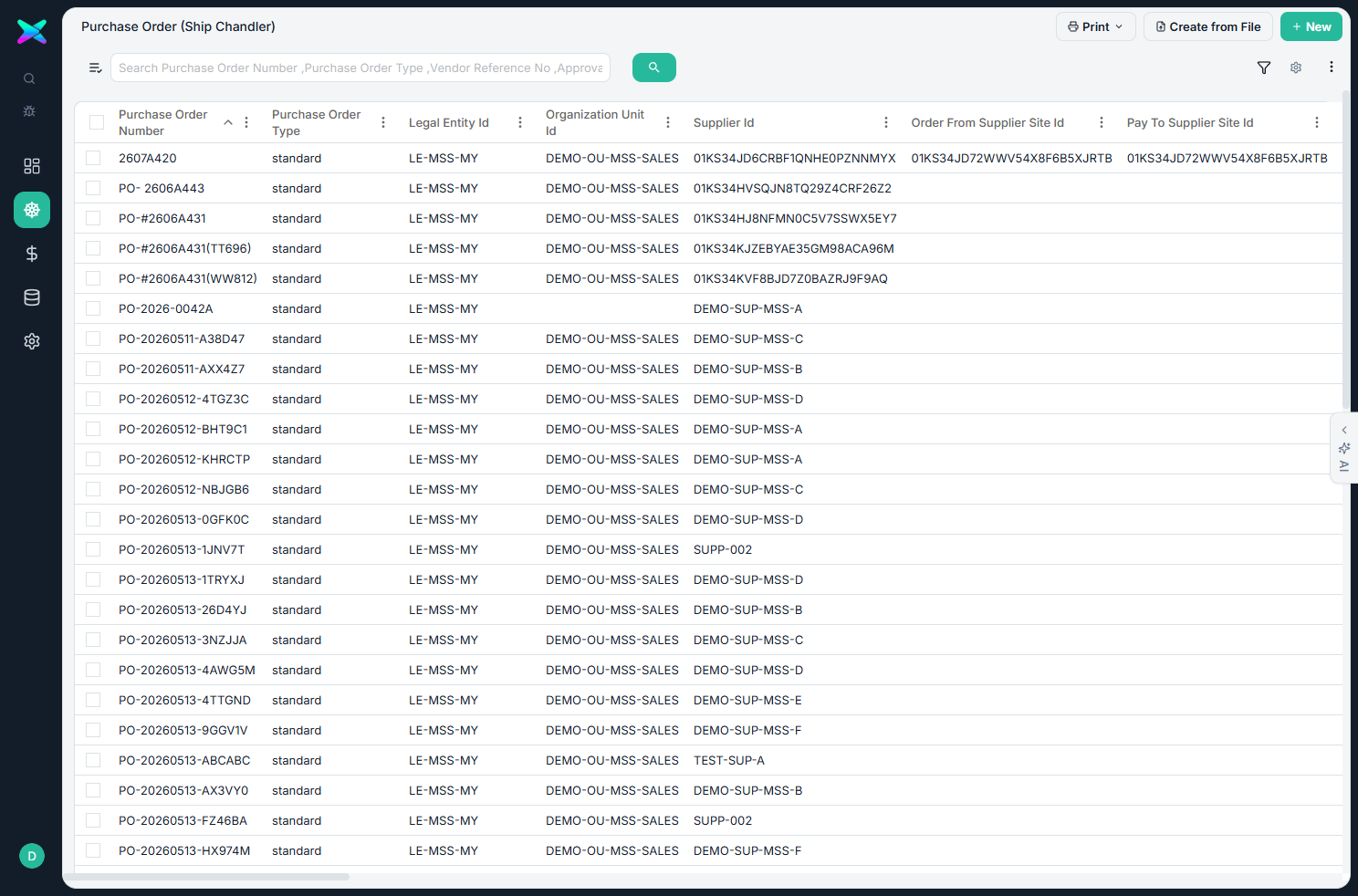
The form
The form is organised into sections:
| Section | What you fill in |
|---|---|
| Overview | PO number (edit with the pencil), PO date, required-by date, PO type, the supplier, currency, warehouse, incoterm, payment term, buyer, vendor reference, the customer's RFQ / PO numbers, and department. |
| Source Supplier Quote | A read-only look at the awarded supplier offer this PO came from. |
| Port Call | The job context — vessel, IMO, port, arrival/departure and agent. |
| PO Lines | Each item with quantity, unit price, discount and line total, plus how much has been received. Opening a line adds unit of measure, required-by date, receiving warehouse, department, description, remark and a customer-requirement note. |
| Notes | A note to the supplier and the shipping marks. |
| Right panel | The supplier's order-from and pay-to address, the operator, and the "FROM" name and phone shown on the PO Letter (defaults to MASHIN SHOKAI). |
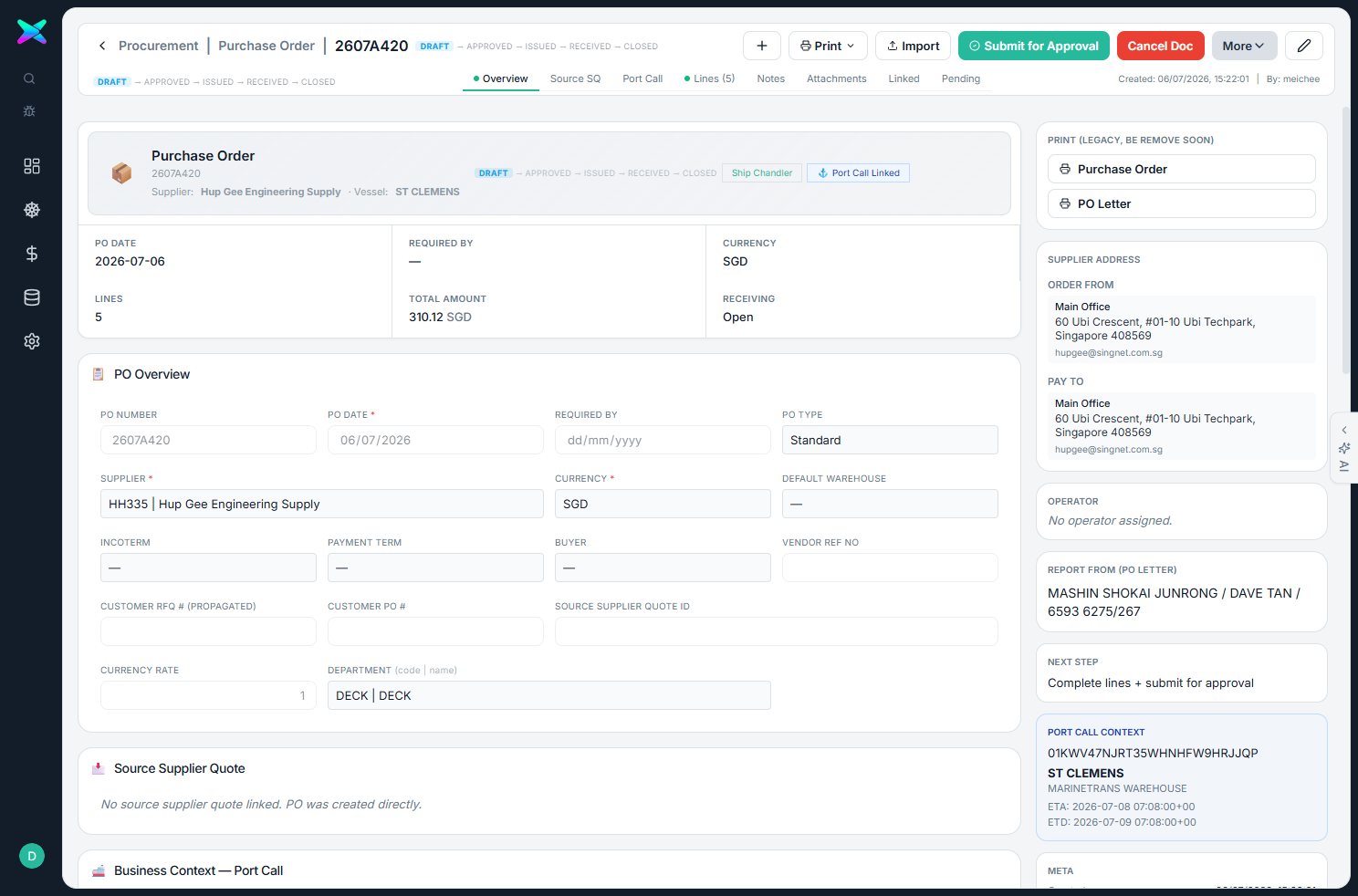
2607A420, supplier Hup Gee Engineering Supply, 5 lines). The right side carries the frozen supplier address (order-from / pay-to), the operator, the PO Letter "FROM" line and the port-call context.What you can do
- Move it through the workflow. A PO goes draft → submit for approval → approve → issue to supplier → closed (or cancelled). The buttons available change with the stage, and a pipeline shows where it is.
- Edit the document number — the app checks it isn't already used.
- Reorder the lines by dragging or sorting; they renumber neatly when you save.
- Keep the supplier address frozen on the PO, pulled from the supplier's defaults.
- Import lines from a file. On a draft, imported lines come in unmatched; the Verify Item button matches them to your catalogue, and anything it can't match you decide by hand.
How to use
- Usually the PO is created for you from a confirmed Sales Order in the Workbench ("Generate POs from SO") — one draft PO per awarded supplier.
- Open a draft, check the lines, prices and supplier address, then Submit for Approval → Approve → Issue to Supplier.
- Print the Purchase Order, PO Letter or Profoma (one at a time, or several together via batch print).
- Receive the stock against it (GRN), then record the supplier's bill (AP Bill).
⬆ Where it comes from
- A confirmed Sales Order — the awarded lines are grouped by supplier and each supplier gets its own PO.
- Or created on its own, or imported from a file.
⬇ What happens next
- Goods Receipt (GRN) — receiving the goods.
- AP Bill — the supplier's invoice.
- Supplier Payment.
What you can print
- Purchase Order — the formal order to the supplier.
- PO Letter — a letter-style version with your "FROM" name at the top.
- Profoma Invoice — with the customer as the consignee.
- All three can be printed for many POs at once — see Batch Printing.